
Applies to: Managers
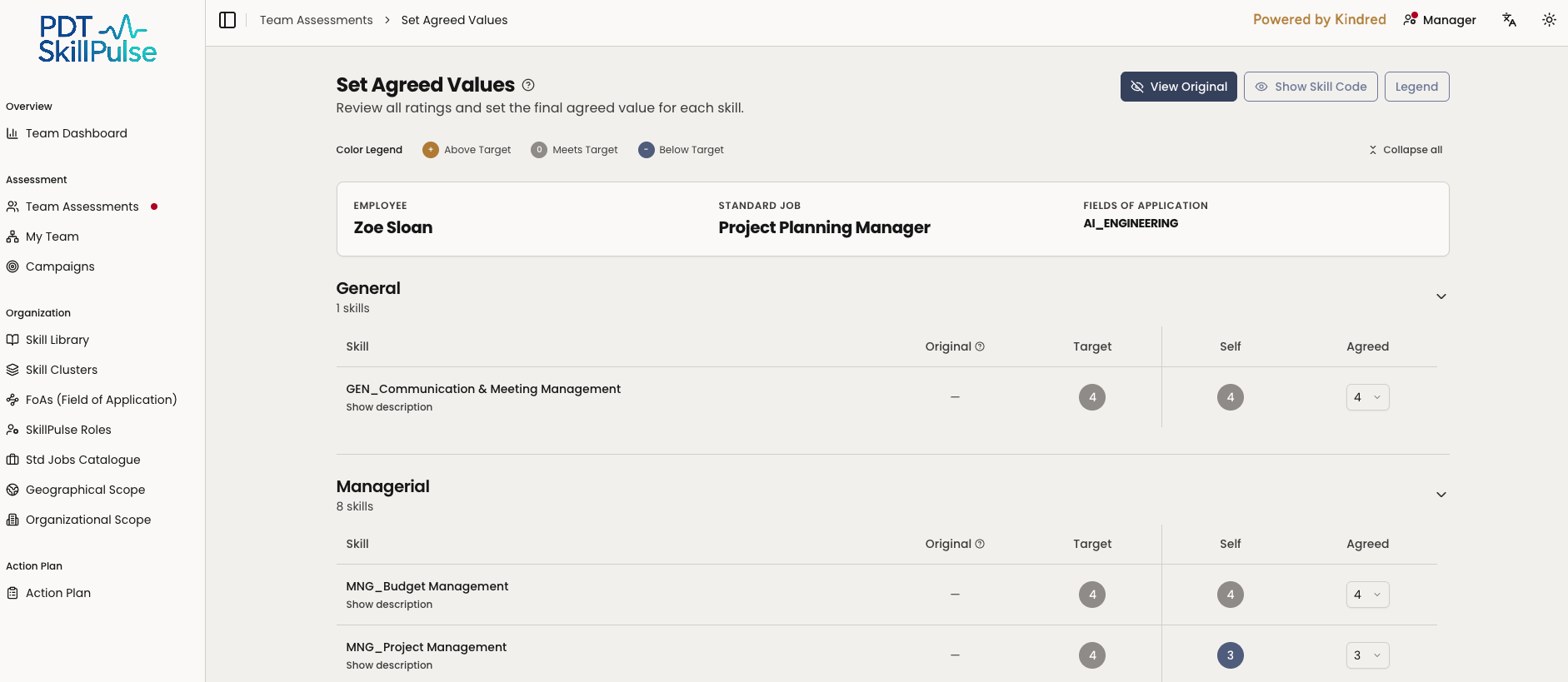
Once you'll have scheduled the agreement meeting; the assessment then moves to Setting agreed values. After everyone has rated, you decide the final agreed value for each skill. This is the manager's call, informed by all the ratings side by side.
Before you start
All participants must have submitted their ratings — the status will show Setting agreed values.
Have the target values in mind; they're the benchmark the agreed values are measured against.
Steps
Open the task — from Team Assessments → Needs Action, open the assessment and select Set Agreed Values.
Compare the ratings — for each skill you'll see the ratings side by side: Target, the employee's (Self) and the co-assessor's (if there is one)— with the Agreed value you set.
3. Choose the final value — set the agreed value (1–5) for each skill. Add a comment where it helps explain your decision. 4. Adjust targets if needed — you can override a target value; provide a reason when prompted. 5. Submit — the assessment moves to Employee reviewing and the employee is notified to accept or dispute.
Tip: Where ratings disagree, a short comment on the agreed value heads off questions later — and gives the employee context during their review.